
YY-Toolkit feature guide
How do I permanently disable Windows Update on Win11/Win10?
This page focuses on Disable Windows auto update with one click (Win10/Win11). It expands the YY-Toolkit overview into a single-purpose guide with use cases, manual steps, and search terms for this Windows task.
Why this Windows setting is often hard to fix
This feature touches several Windows settings, services, or policies, so changing only one visible switch may not be enough.
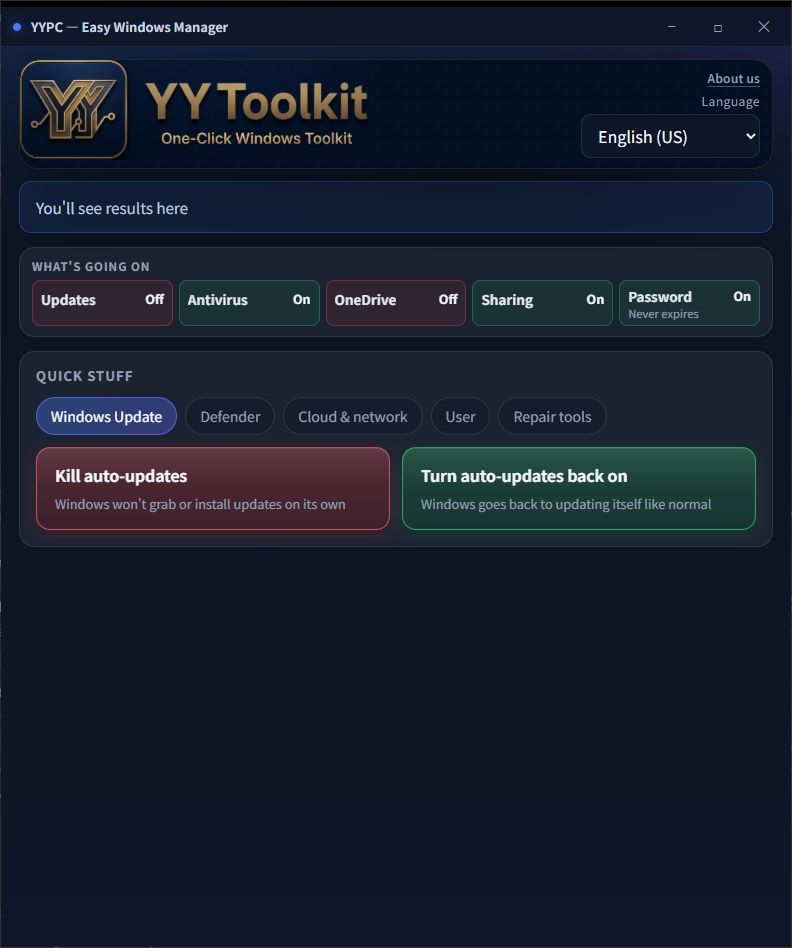
No Control Panel, services, or Registry Editor—in the Windows Update tab, press Stop auto update to fully block downloads, installs, and background schedules. Restore anytime you need.
With YY-Toolkit: open the app → Windows Update tab → press Stop auto update for a full shutdown. Without this app, follow these manual steps:
How YY-Toolkit helps
No Control Panel, services, or Registry Editor—in the Windows Update tab, press Stop auto update to fully block downloads, installs, and background schedules. Restore anytime you need.
Stop auto update
Fully stops Windows Update downloads, installs, background schedules, and related services/policies—not just a short pause, and helps prevent the Medic service from turning updates back on.
Restore auto update
Turn automatic updates back on when you need security patches.
Stop auto update: Fully stops Windows Update downloads, installs, background schedules, and related services/policies—not just a short pause, and helps prevent the Medic service from turning updates back on.
Restore auto update: Turn automatic updates back on when you need security patches.
How do I permanently disable Windows Update on Win11/Win10?
With YY-Toolkit: open the app → Windows Update tab → press Stop auto update for a full shutdown. Without this app, follow these manual steps:
- [Short term only] Settings → Windows Update → Pause updates for a few weeks (it turns back on automatically—not a permanent off).
- [Policy—Pro/Enterprise] gpedit.msc → Computer Configuration → Administrative Templates → Windows Components → Windows Update → Configure Automatic Updates → Disabled; optionally Remove access to use all Windows Update features → Enabled.
- [Services—do several] services.msc as admin—stop and set Disabled: Windows Update (wuauserv), Update Orchestrator Service (UsoSvc), Windows Update Medic Service (WaasMedicSvc); optionally Background Intelligent Transfer Service (BITS).
- [Registry] regedit → HKLM\SOFTWARE\Policies\Microsoft\Windows\WindowsUpdate\AU (create keys if needed)—DWORD NoAutoUpdate = 1; AUOptions = 1 (notify only, no download).
- [Scheduled tasks] Task Scheduler → Task Scheduler Library → Microsoft → Windows → WindowsUpdate—disable the update-related tasks.
- [Delivery Optimization] Settings → Windows Update → Advanced options → Delivery Optimization—turn off downloads from other PCs.
- Note: disabling only one service may be undone by Medic Service or scheduled tasks; a full shutdown like this app needs policy/registry/services/tasks together.
- [Restore] Reverse the steps: re-enable tasks and services, remove or revert registry/policy, cancel pause in Windows Update, then check for updates manually.
Common search questions and phrases
People often search for this feature with problem descriptions, Windows setting names, service names, or error codes.
- How do I permanently disable Windows Update on Win11/Win10?
- turn off windows update permanently
- Win11 how to stop updates
- stop windows automatic updates
- disable windows update service
- prevent windows from updating
Related search keywords
These terms are grouped naturally from the page content, including Windows versions, setting names, services, and common symptoms.
- turn off windows update permanently
- Win11 how to stop updates
- stop windows automatic updates
- disable windows update service
- prevent windows from updating
- block windows 11 updates
- pc keeps updating on its own
- windows update keeps restarting pc
- Disable Windows auto update with one click (Win10/Win11)
- How do I permanently disable Windows Update on Win11/Win10?
- Stop auto update
- Restore auto update
- Windows 10
- Windows 11
- Win10
- Win11
- YY-Toolkit
FAQ
How do I permanently disable Windows Update on Win11/Win10?
No Control Panel, services, or Registry Editor—in the Windows Update tab, press Stop auto update to fully block downloads, installs, and background schedules. Restore anytime you need. Stop auto update: Fully stops Windows Update downloads, installs, background schedules, and related services/policies—not just a short pause, and helps prevent the Medic service from turning updates back on. Restore auto update: Turn automatic updates back on when you need security patches. These actions may change Windows system, network, update, or security settings. Use them only when you understand the impact. If this PC is managed by a company or IT administrator, check the internal policy before changing these settings.
turn off windows update permanently
No Control Panel, services, or Registry Editor—in the Windows Update tab, press Stop auto update to fully block downloads, installs, and background schedules. Restore anytime you need. Stop auto update: Fully stops Windows Update downloads, installs, background schedules, and related services/policies—not just a short pause, and helps prevent the Medic service from turning updates back on. Restore auto update: Turn automatic updates back on when you need security patches. These actions may change Windows system, network, update, or security settings. Use them only when you understand the impact. If this PC is managed by a company or IT administrator, check the internal policy before changing these settings.
Win11 how to stop updates
No Control Panel, services, or Registry Editor—in the Windows Update tab, press Stop auto update to fully block downloads, installs, and background schedules. Restore anytime you need. Stop auto update: Fully stops Windows Update downloads, installs, background schedules, and related services/policies—not just a short pause, and helps prevent the Medic service from turning updates back on. Restore auto update: Turn automatic updates back on when you need security patches. These actions may change Windows system, network, update, or security settings. Use them only when you understand the impact. If this PC is managed by a company or IT administrator, check the internal policy before changing these settings.
stop windows automatic updates
No Control Panel, services, or Registry Editor—in the Windows Update tab, press Stop auto update to fully block downloads, installs, and background schedules. Restore anytime you need. Stop auto update: Fully stops Windows Update downloads, installs, background schedules, and related services/policies—not just a short pause, and helps prevent the Medic service from turning updates back on. Restore auto update: Turn automatic updates back on when you need security patches. These actions may change Windows system, network, update, or security settings. Use them only when you understand the impact. If this PC is managed by a company or IT administrator, check the internal policy before changing these settings.
Disable Windows auto update with one click (Win10/Win11) — Before you change it
These actions may change Windows system, network, update, or security settings. Use them only when you understand the impact. If this PC is managed by a company or IT administrator, check the internal policy before changing these settings.
Disable Windows auto update with one click (Win10/Win11) — Download YY-Toolkit
If you want to handle this task with the tool, return to the full YY-Toolkit overview page. The other Windows maintenance features are listed there too.
Before you change it
- These actions may change Windows system, network, update, or security settings. Use them only when you understand the impact.
- If this PC is managed by a company or IT administrator, check the internal policy before changing these settings.
Related Windows names
You can combine these terms with Win10, Win11, Windows 10, Windows 11, or YY-Toolkit when searching.
If you came from Google, read the manual steps first, then return to the full overview page to download the tool.
Download YY-Toolkit
If you want to handle this task with the tool, return to the full YY-Toolkit overview page. The other Windows maintenance features are listed there too.