
 Coming soon
YY-MultiUSB
USB partitioning, data copy, and bulk USB creation
YY-MultiUSB is a Windows USB partition tool and bulk USB creation tool by YouYue Technology. Set up partition layouts, format multiple partitions, and optionally copy prepared files to each USB drive. It supports normal partitioning, Windows installer-style layouts, and Ventoy-style menu layouts for teams that need to make many USB drives with the same structure. Store review is still in progress, so downloads are not available yet.
Windows only
For paid versions, purchase inside the app with your Google account. No checkout on this website.
Screenshots
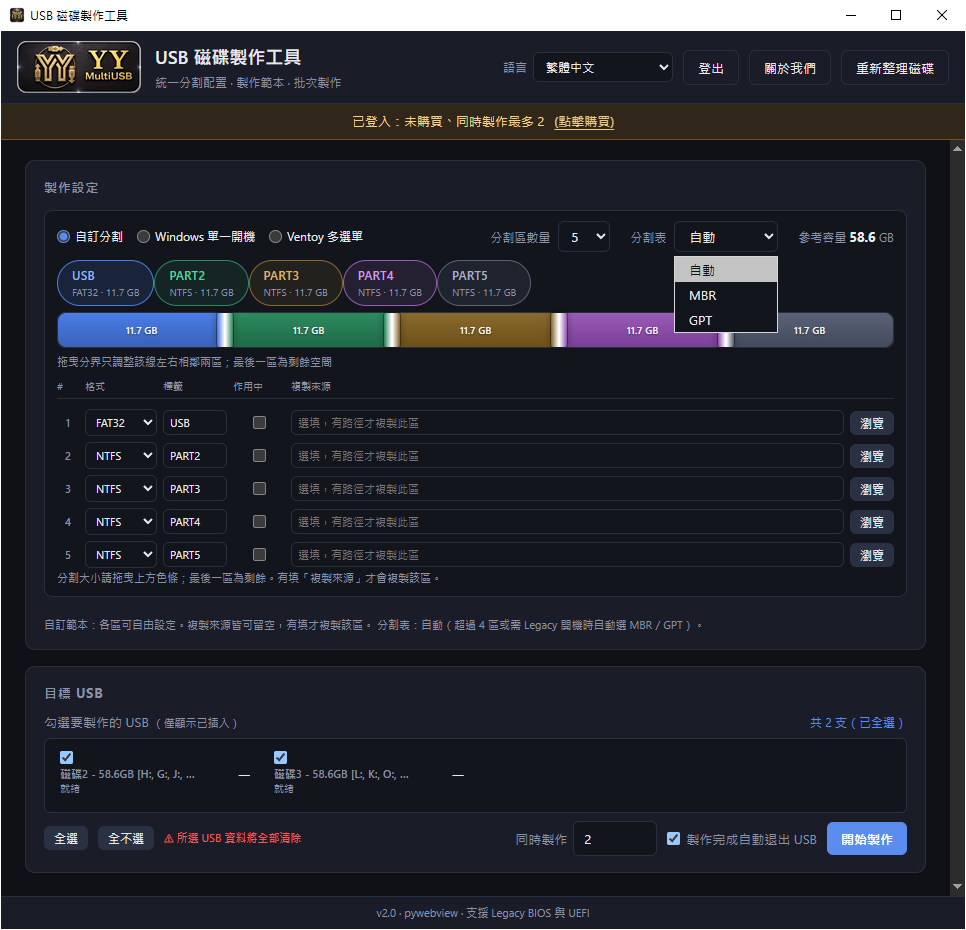
Main screen: partition, format, and bulk creation settings
Choose the partition mode, partition count, file system, and label on one screen. You can also assign a copy source to each partition, then select connected USB drives for batch creation.

Subscription note: same features, different parallel limit
The main difference between free use, signed-in free use, and Pro is the number of USB drives processed at the same time. All other features are the same, so you can try it long-term first.
What you can do
- Create normal USB partitions, Windows installer-style layouts, or Ventoy-style menu layouts.
- Choose the number of partitions, file system, label, and optional copy source for each partition.
- Select multiple USB drives and process them in parallel based on the simultaneous creation limit.
- When one USB drive finishes, the next one starts automatically until the whole batch is done.
- After creation, the app checks the partition format and copied files, then ejects the USB drive if everything is correct.
- The free version does not expire; Google sign-in raises the free parallel limit to 2 drives, and Pro removes the software limit.
From one USB drive to a bulk creation workflow
YY-MultiUSB is built for the full workflow: set partitions, batch format, copy files, check the result, and eject the drive. Choose the mode and partition count first, then set the format, label, and optional source folder for each partition.
The lower area lists connected USB drives. Select the targets and press Start. If the simultaneous creation limit is 2, the app processes up to 2 drives at the same time; when one finishes, the next selected drive starts automatically. This is useful when working through a USB hub.
After a drive is done, YY-MultiUSB checks whether the format and copied data match the setup before ejecting it. It is designed for repair benches, small studios, classrooms, and any workflow that prepares many matching USB drives.
- Set up once and apply to many USB drives.
- Copy source is optional; leave it empty if you only need partitioning and formatting.
- Simultaneous creation means real parallel processing, not just a queue on screen.
- Completed drives are checked and ejected to reduce missed or wrong removals.
How the three partition modes are positioned
Normal partitioning is for splitting a USB drive into several partitions, such as tools, data, and customer files. You can set the partition count, format, and label to build a multi-partition USB.
The Windows installer-style layout helps organize the partition setup for Windows installation or repair USB drives. YY-MultiUSB does not provide Windows installation files, ISO files, or licenses; users must prepare legal sources themselves.
The Ventoy-style layout is for people who want a menu-style USB layout. YY-MultiUSB does not bundle Ventoy, ISO files, or third-party tools; it handles partitioning, formatting, file copying, and batch creation.
- Normal partitioning: organize data across multiple USB partitions.
- Windows installer-style layout: standardize the disk layout for installation USB drives.
- Ventoy-style layout: prepare a menu-style USB partition structure.
- No mode includes Windows files, ISO files, Ventoy, or other third-party files.
Free version and Pro subscription
The feature set is the same; the main difference is the simultaneous creation limit.
| Status | Price | Simultaneous limit | Note |
|---|---|---|---|
| Not signed in | Free | 1 drive | Use forever without signing in |
| Signed in with Google, no purchase | Free | 2 drives | Use forever; good for long-term trial |
| Signed in with Google and subscribed to Pro | $8.5/month or $85/year | No software limit | Yearly saves $17 compared with 12 monthly payments |
- Subscriptions can be canceled anytime. Because the free version has no time limit and the same features, purchases are non-refundable.
How it differs from similar USB tools
YY-MultiUSB is not meant to replace every USB utility. If you only need one bootable USB, Rufus, Ventoy, or Microsoft's official tool may be enough. YY-MultiUSB is closer to a batch creation assistant when you need many USB drives with the same partition layout and data.
Compared with disk partition tools, YY-MultiUSB focuses on applying one setup to many USB drives and checking the result. Compared with a plain file copier, it partitions and formats first, then copies files according to each partition's setup.
Compared with Windows official USB tools or Ventoy, YY-MultiUSB does not provide installers, ISO files, Ventoy itself, or third-party downloads. It standardizes the workflow after you have prepared your own files.
| Compared with | Main use | YY-MultiUSB difference | Best fit |
|---|---|---|---|
| Disk partition tools | Manually create, delete, or resize partitions | Applies the same partition and format setup to many USB drives and checks the result | Making many same-spec USB drives |
| Basic file copy tools | Copy files from one place to another | Partitions and formats first, then copies files to each configured partition | Format/partition first, then load prepared files |
| Windows official USB tool | Create a Windows installation USB | Does not provide Windows files or ISO; focuses on layout and batch creation | You already have legal installation files and need multiple USB drives |
| Ventoy | Create a menu USB that can hold multiple ISO files | Does not bundle Ventoy or ISO files; provides a Ventoy-style partition flow | Organizing Ventoy-style USB drives in batches |
| Rufus-style ISO writers | Write one ISO to one USB drive | Not a single-ISO writer; focuses on many USB drives, partitioning, file copy, and checks | Repair desks or studios repeatedly making USB drives |
Requirements
- Windows 10 or Windows 11
- Administrator permission for USB partitioning and formatting
- Inserted USB flash drives or external USB disks
- Google sign-in is required for paid features
- 20 interface languages supported
Installation
- The app is waiting for store review, so downloads are not available yet.
- After release, you can use it for free: 1 USB drive at a time without sign-in, or up to 2 drives after signing in without purchase.
- To remove the simultaneous creation limit, sign in with Google inside the app and subscribe to Pro.
- Pro is $8.5/month or $85/year. You can cancel anytime; purchases are non-refundable.