
YY-Toolkit feature guide
How do I completely turn off OneDrive? How do I uninstall and stop startup sync?
This page focuses on Turn off OneDrive and network sharing with one click (Win10/Win11). It expands the YY-Toolkit overview into a single-purpose guide with use cases, manual steps, and search terms for this Windows task.
Why this Windows setting is often hard to fix
This feature touches several Windows settings, services, or policies, so changing only one visible switch may not be enough.
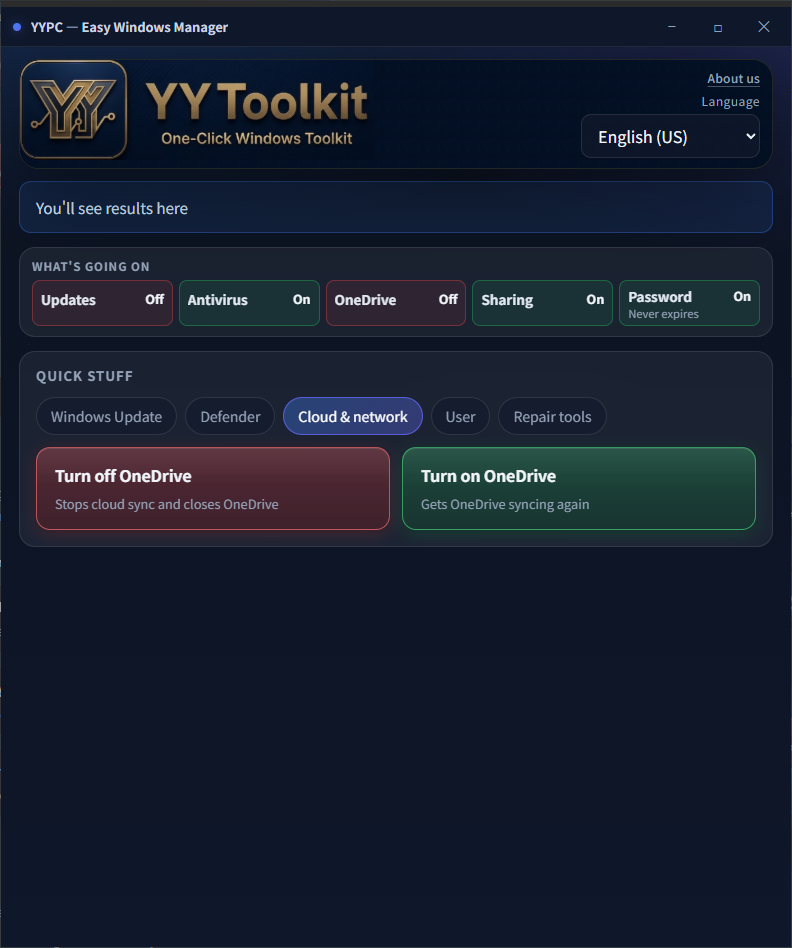
See at a glance whether OneDrive and LAN file sharing are on or off, and switch them directly—no digging through Settings.
With YY-Toolkit: Network & Cloud tab → press Close OneDrive. To adjust LAN file sharing, use the same tab. Without this app, follow these manual steps:
How YY-Toolkit helps
See at a glance whether OneDrive and LAN file sharing are on or off, and switch them directly—no digging through Settings.
Close OneDrive
Unlink, uninstall, and stop background and startup so Windows Update is less likely to reinstall OneDrive later.
Open OneDrive
Restore sync and backup when you need cross-device sync again.
Close OneDrive: Unlink, uninstall, and stop background and startup so Windows Update is less likely to reinstall OneDrive later.
Open OneDrive: Restore sync and backup when you need cross-device sync again.
How do I completely turn off OneDrive? How do I uninstall and stop startup sync?
With YY-Toolkit: Network & Cloud tab → press Close OneDrive. To adjust LAN file sharing, use the same tab. Without this app, follow these manual steps:
- [Full OneDrive shutdown] Click the cloud icon in the taskbar → Settings → Unlink this PC or sign out, and turn off Start OneDrive when I sign in to Windows.
- Uninstall: Settings → Apps → Installed apps → Microsoft OneDrive → Uninstall. (Or run %localappdata%\Microsoft\OneDrive\OneDriveSetup.exe /uninstall)
- Open Task Manager → Startup and make sure Microsoft OneDrive is Disabled.
- Quit or uninstall alone may not stop Windows Update from bringing it back. For a full shutdown like this app: on Pro/Enterprise, use Group Policy → Computer Configuration → Administrative Templates → Windows Components → OneDrive → Prevent the usage of OneDrive for file storage → Enabled.
- On Home editions without Group Policy: run regedit as admin, create DWORD DisableFileSyncNG = 1 under HKEY_LOCAL_MACHINE\SOFTWARE\Policies\Microsoft\Windows\OneDrive (create the keys if missing).
- Restart when done; updates are less likely to reinstall OneDrive or sync in the background.
- To restore: remove the policy/registry value, reinstall OneDrive, and sign in again.
- [Network sharing] Settings → Network & internet → Advanced network settings → Advanced sharing settings → turn File and printer sharing and Network discovery on or off for your profile.
Common search questions and phrases
People often search for this feature with problem descriptions, Windows setting names, service names, or error codes.
- How do I completely turn off OneDrive? How do I uninstall and stop startup sync?
- stop onedrive background sync
- disable onedrive startup
- onedrive keeps coming back
- onedrive using too much disk
- lan file sharing settings
Related search keywords
These terms are grouped naturally from the page content, including Windows versions, setting names, services, and common symptoms.
- stop onedrive background sync
- disable onedrive startup
- onedrive keeps coming back
- onedrive using too much disk
- lan file sharing settings
- enable file and printer sharing
- turn off network discovery
- disable onedrive completely
- Turn off OneDrive and network sharing with one click (Win10/Win11)
- How do I completely turn off OneDrive? How do I uninstall and stop startup sync?
- Close OneDrive
- Open OneDrive
- Windows 10
- Windows 11
- Win10
- Win11
- YY-Toolkit
FAQ
How do I completely turn off OneDrive? How do I uninstall and stop startup sync?
See at a glance whether OneDrive and LAN file sharing are on or off, and switch them directly—no digging through Settings. Close OneDrive: Unlink, uninstall, and stop background and startup so Windows Update is less likely to reinstall OneDrive later. Open OneDrive: Restore sync and backup when you need cross-device sync again. These actions may change Windows system, network, update, or security settings. Use them only when you understand the impact. If this PC is managed by a company or IT administrator, check the internal policy before changing these settings.
stop onedrive background sync
See at a glance whether OneDrive and LAN file sharing are on or off, and switch them directly—no digging through Settings. Close OneDrive: Unlink, uninstall, and stop background and startup so Windows Update is less likely to reinstall OneDrive later. Open OneDrive: Restore sync and backup when you need cross-device sync again. These actions may change Windows system, network, update, or security settings. Use them only when you understand the impact. If this PC is managed by a company or IT administrator, check the internal policy before changing these settings.
disable onedrive startup
See at a glance whether OneDrive and LAN file sharing are on or off, and switch them directly—no digging through Settings. Close OneDrive: Unlink, uninstall, and stop background and startup so Windows Update is less likely to reinstall OneDrive later. Open OneDrive: Restore sync and backup when you need cross-device sync again. These actions may change Windows system, network, update, or security settings. Use them only when you understand the impact. If this PC is managed by a company or IT administrator, check the internal policy before changing these settings.
onedrive keeps coming back
See at a glance whether OneDrive and LAN file sharing are on or off, and switch them directly—no digging through Settings. Close OneDrive: Unlink, uninstall, and stop background and startup so Windows Update is less likely to reinstall OneDrive later. Open OneDrive: Restore sync and backup when you need cross-device sync again. These actions may change Windows system, network, update, or security settings. Use them only when you understand the impact. If this PC is managed by a company or IT administrator, check the internal policy before changing these settings.
Turn off OneDrive and network sharing with one click (Win10/Win11) — Before you change it
These actions may change Windows system, network, update, or security settings. Use them only when you understand the impact. If this PC is managed by a company or IT administrator, check the internal policy before changing these settings.
Turn off OneDrive and network sharing with one click (Win10/Win11) — Download YY-Toolkit
If you want to handle this task with the tool, return to the full YY-Toolkit overview page. The other Windows maintenance features are listed there too.
Before you change it
- These actions may change Windows system, network, update, or security settings. Use them only when you understand the impact.
- If this PC is managed by a company or IT administrator, check the internal policy before changing these settings.
Related Windows names
You can combine these terms with Win10, Win11, Windows 10, Windows 11, or YY-Toolkit when searching.
If you came from Google, read the manual steps first, then return to the full overview page to download the tool.
Download YY-Toolkit
If you want to handle this task with the tool, return to the full YY-Toolkit overview page. The other Windows maintenance features are listed there too.